
AI client integration
UNSENDBOX INTEGRATIONS

Connect Claude Code to the Unsendbox MCP server
For developers and operations teams working in a terminal, this connection lets Claude Code discover organization-scoped Unsendbox tools for email, addresses, domains, routing, suppressions, sequences, and related workflows.
Claude Code is an external AI client that connects to Unsendbox through a remote Streamable HTTP MCP server. Add the server with the Claude Code CLI, complete OAuth, then inspect the connection before running a read-only smoke test.
The Unsendbox MCP endpoint is live and OAuth-protected. Claude Code can reach it and begin authentication. This page does not present the connector as successfully authenticated, verified, or listed, because a clean-account OAuth callback and organization binding have not been verified yet.
- Streamable HTTP MCP
- OAuth-scoped session
- Read-only smoke test first
How do I connect Claude Code to the Unsendbox MCP server?
Add the live Unsendbox Streamable HTTP endpoint with claude mcp add, complete the OAuth flow for the intended organization, verify the server with claude mcp list or /mcp, and begin with a read-only operation. Production reachability and OAuth discovery are verified. A clean-account OAuth callback and organization binding still require verification.
Delivery & connection role
Claude Code complements Unsendbox as the external agent client. Unsendbox exposes the organization-scoped email tools and enforces their authorization boundary.
- Connection protocol
- Streamable HTTP MCP
- Authorization boundary
- OAuth scopes and the selected organization constrain every tool call.
Provider-specific gotchas
- Complete OAuth discovery instead of adding an API key to the Claude Code server entry.
- Confirm the selected organization before running a write-capable tool.
Overview
Claude Code supports remote MCP servers over Streamable HTTP. Unsendbox exposes organization-scoped email and workflow capabilities through its MCP server, with progressive discovery for advanced tool families.
This connection keeps Claude Code as the external client and Unsendbox as the email and workflow system. Write operations remain subject to Unsendbox sender, DNS, suppression, quota, deliverability, permission, and approval controls.
Available Unsendbox capability families
- Threads and messages
- Read and manage threads and messages.
- Outbound email
- Send and reply to email through outbound tools.
- Addresses
- Manage addresses and address identity metadata.
- Domains
- Manage domains and health checks.
- Routing
- Manage mirror rules and suppressions.
- Credentials
- Manage masked address credentials without exposing decrypted credentials through MCP.
- Sequences
- Manage sequences and enrollments.
- Progressive discovery
- Discover advanced operations through describe_capabilities and use_capability.
Best for
- Developers and operations users who already work in Claude Code.
- Teams that want repeatable email and workflow operations in a terminal session.
- Organizations that need OAuth-scoped sessions, approval for writes, and dashboard review.
Not best for
- Non-technical users who need a visual mailbox-first workflow.
- Teams that need native Gmail history, labels, or two-way mailbox sync.
- A production rollout that cannot wait for clean-account OAuth callback and organization-binding verification.
Connect Claude Code
- 01
Add the Unsendbox server
Run this command in your terminal.
claude mcp add --transport http unsendbox https://unsendbox.com/api/v1/mcp - 02
Complete OAuth
Follow the authorization prompt, sign in to Unsendbox, and authorize the intended organization. Claude Code owns a local loopback callback whose port can vary by session.
Custom clients that can set x-api-key have a separate path in the Unsendbox guide. That path is not the canonical Claude Code path and is not a Claude Directory authentication claim.
- 03
Verify the connection
You can also open /mcp inside Claude Code. Confirm that the Unsendbox server is reachable, then complete authentication before asking Claude to use organization data.
claude mcp list
claude mcp get unsendbox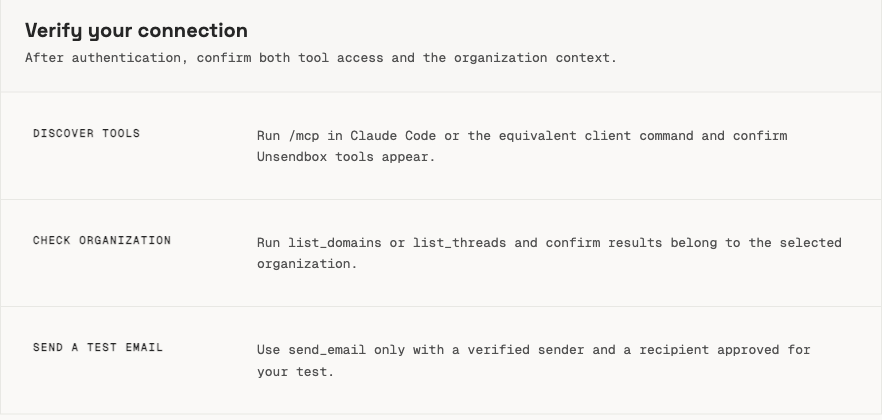
The Unsendbox guide describes the verification actions to run after adding the server. It does not represent a completed authenticated session. - 04
Start with a read-only smoke test
Ask Claude Code to list domains or threads for the authorized organization. Review the result and organization context before approving any write operation.
- 05
Approve writes deliberately
For sending, replying, routing, or workflow changes, review the requested action, target organization, sender, and recipients before approval.
Setup proof
Work through this checklist before you let Claude Code act on organization data. Each item is a state you can see in your terminal or in the Unsendbox dashboard.
- claude mcp list shows unsendbox with the https://unsendbox.com/api/v1/mcp endpoint.
- The authorization prompt opens Unsendbox and names the organization you intend to authorize.
- A read-only request, such as listing domains, returns data for that organization only.
- Every write request states the sender, recipients, and target organization before you approve it.
- The resulting action appears in the Unsendbox dashboard where you can review it.
Limitations
- Use only the canonical endpoint at https://unsendbox.com/api/v1/mcp in commands and links.
- Production OAuth metadata is reachable, but a clean-account callback and organization binding remain unverified.
- Unsendbox does not claim that this connector is successfully authenticated, verified, community-listed, submitted, or directory-eligible.
- Claude Directory category names and icon pixel requirements were not verified.
- Authenticated Claude Directory submissions require OAuth 2.0. Static request headers are not a substitute for the directory requirement.
- This connection does not provide native Gmail sync, historical mailbox import, or a mailbox-first visual workflow.
- Available actions still depend on the authorized organization, permissions, sender configuration, DNS health, suppressions, quotas, and approval.
Frequently asked questions
Does Claude Code support remote Streamable HTTP MCP servers?
Yes. Claude Code documents remote HTTP MCP servers and recommends Streamable HTTP for remote connections.
What is the Unsendbox MCP endpoint?
Use https://unsendbox.com/api/v1/mcp. The production endpoint returns an OAuth challenge and publishes discovery metadata on the apex host. A clean-account OAuth callback and organization binding still need verification.
Should Claude Code use OAuth or an API key?
Use OAuth for Claude Code. Unsendbox documents x-api-key separately for custom clients that can set that header. It is not the canonical Claude Code or Claude Directory path.
Which Unsendbox operations can Claude Code use?
The MCP server covers threads, messages, outbound email, addresses, domains, health checks, mirror rules, suppressions, sequences, and related operations. Advanced families are discovered through describe_capabilities and use_capability.
Why does Claude ask for approval before a write?
A write can send email or change organization data. Review the organization, sender, recipients, and requested operation before approval.
Is Unsendbox listed in the Claude Connectors Directory?
No listing is claimed. A clean-account OAuth callback, organization binding, and current submission checks must be completed first.
You might be interested in
Unsendbox documentation
Build your own integration
Unsendbox exposes its email and workflow operations through an organization-scoped MCP server, so you can connect another AI client or internal service the same way.