
Email delivery integration
UNSENDBOX INTEGRATIONS

Use Postmark with Unsendbox to send and receive domain email
For technical teams that already use Postmark, Unsendbox can use a Postmark server for outbound delivery and authenticated raw-email ingestion while it manages addresses, threads, routing, suppressions, and AI workflows.
Postmark is email delivery infrastructure. Unsendbox connects to it with a server token for outbound mail, generated DNS records for the domain, and a Basic-authenticated inbound webhook with raw email enabled.
- Server token
- Four DNS records
- Authenticated inbound webhook
How do I use Postmark with Unsendbox to send and receive email from my domain?
Choose Postmark as the Unsendbox SMTP relay, add the four DNS records generated for your domain, enable raw inbound email in Postmark, and configure the authenticated inbound hook shown by Unsendbox. Verify the domain and send controlled outbound and inbound tests before production use.
Delivery & connection role
Postmark complements Unsendbox as the outbound delivery and inbound transport layer. Unsendbox remains the agent workflow and clearinghouse layer.
- Transport mode
- Postmark server API and authenticated inbound webhook
- Routing boundary
- Postmark delivers email while Unsendbox manages addresses, threads, routing, and agent workflows.
Provider-specific gotchas
- Enable raw inbound email before testing the webhook.
- Use the Postmark account token for server settings and keep the server token scoped to delivery.
Overview
Postmark provides transactional email delivery infrastructure. This integration is for teams that want Unsendbox to manage sender identities, threads, routing, suppression checks, and AI-driven email operations while Postmark handles the delivery transport.
Outbound messages use the Postmark email API with a server token. Inbound processing depends on Postmark sending the raw message to an Unsendbox webhook that validates HTTP Basic authentication before parsing or ingestion.
What each product does
- Postmark
- Sends email through its Email API and posts parsed inbound messages to a configured webhook.
- Unsendbox
- Manages domains, addresses, threads, routing, suppressions, and workflow operations around that transport.
- Differentiation
- This is a transport connection, not a mailbox replacement or a Postmark marketing-automation layer.
Best for
- Teams that already operate a Postmark server.
- Technical users who control DNS and Postmark server settings.
- Organizations that want Unsendbox on a dedicated email subdomain while another provider remains on the root domain.
Not best for
- Teams looking for a visual mailbox supplied by Postmark.
- Teams seeking campaign list management from this connection.
- Organizations that cannot configure DNS, inbound server settings, or deployment-managed webhook credentials.
Set up Postmark with Unsendbox
- 01
Create or choose a Postmark server
Use a Postmark server that is intended for the Unsendbox domain. Obtain its server API token. Do not use or expose an account token in the Unsendbox server-token field.
- 02
Select Postmark in Unsendbox
In Unsendbox, open Dashboard, then Addresses, then Domains, then Connect Domain. Choose SMTP Relay (Postmark) and enter the Postmark server token. Never include the token in screenshots or shared logs.
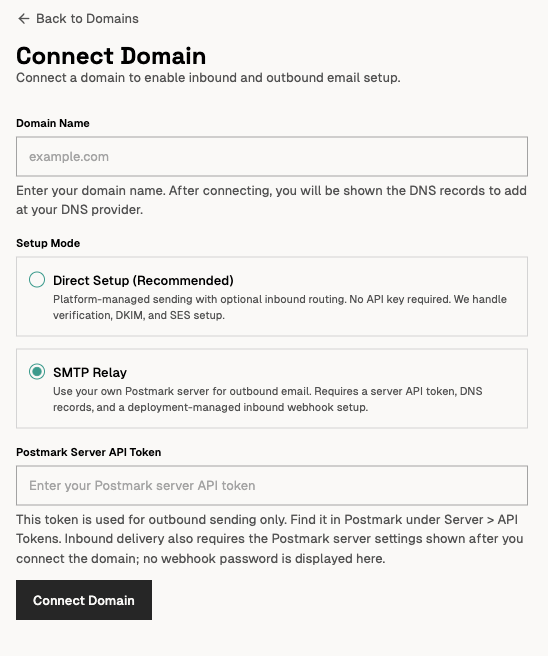
The Unsendbox Connect Domain form with SMTP Relay (Postmark) selected. The token field is empty. - 03
Add the generated DNS records
Add the four records shown by Unsendbox for the domain. Use the values generated for the current domain. Do not copy a DKIM selector from a marketing screenshot.
- MX pointing to inbound.postmarkapp.com with priority 10.
- SPF including spf.mtasv.net.
- The generated Postmark DKIM CNAME.
- The generated return-path CNAME pointing to pm.mtasv.net.
- 04
Enable raw inbound email
In the Postmark server settings, enable RawEmailEnabled. Unsendbox requires the RawEmail field to process the original MIME message.

Unsendbox states the Postmark inbound requirements, and never displays the webhook password. - 05
Configure the authenticated inbound hook
Set the Postmark InboundHookUrl to the URL provided by the Unsendbox deployment. Configure HTTP Basic authentication with username postmark and the deployment-managed ingest secret as the password. Never expose or hardcode that secret.
InboundHookUrl=https://app.unsendbox.com/api/v1/webhooks/inbound/postmark RawEmailEnabled=true BasicAuthUsername=postmark - 06
Verify before production
Confirm the Unsendbox domain health checks, send a controlled outbound message, then send an inbound message to the configured address. Verify recipient mapping and raw-message ingestion. Keep credentials and message content redacted in public evidence.
Setup proof
Work through this checklist before you route production mail. Each item is a state you can see in Unsendbox or in the recipient inbox.
- Unsendbox shows SMTP Relay (Postmark) as the selected transport for the domain.
- The domain health check passes for MX, SPF, DKIM, and the return path.
- A controlled outbound test message reaches the recipient inbox rather than the spam folder.
- A controlled inbound test message reaches the intended Unsendbox address with the raw message parsed.
- Credentials and message content stay redacted in any evidence you share.
Limitations
- Postmark is the delivery transport in this connection. It is not the Unsendbox mailbox or workflow interface.
- Postmark uses one inbound webhook URL per inbound stream.
- Webhook retries do not replace request authentication.
- DNS and Postmark server settings require administrative access.
- Keep a different mailbox provider on the root domain by using a dedicated Unsendbox subdomain or selected forwarding. Do not replace root MX records accidentally.
- Public permission for Postmark logo use beyond nominative reference, and a dedicated integration-directory submission path, remain unverified.
Frequently asked questions
What is the difference between a Postmark server token and an account token?
Unsendbox uses a Postmark server token for the selected server. The outbound API authenticates with the X-Postmark-Server-Token header.
Why does Unsendbox require raw inbound email?
Unsendbox parses the original MIME message from the Postmark RawEmail field. Postmark includes that field only when RawEmailEnabled is enabled for the server.
How is the Postmark inbound webhook secured?
The Unsendbox setup requires HTTP Basic authentication on the inbound hook. The username is postmark, and the password is the deployment-managed ingest secret. Unsendbox rejects missing or invalid credentials before parsing the message.
Can Postmark and Google Workspace serve the same organization?
Yes, when their responsibilities and DNS are separated. Keep Google Workspace on the root domain and use a dedicated Unsendbox subdomain or selected forwarding rather than replacing the root mailbox setup.
Is Unsendbox listed in the Postmark integrations directory?
No listing is claimed. A dedicated public submission route and logo-use permission were not verified during research.
You might be interested in
Unsendbox documentation
Build your own integration
Unsendbox exposes its email and workflow operations through an organization-scoped MCP server, so you can connect another AI client or internal service the same way.