
Mailbox forwarding integration
UNSENDBOX INTEGRATIONS for Gmail™
Gmail is a trademark of Google LLC
Forward selected Gmail messages to Unsendbox
For teams that want Google Workspace to remain the primary mailbox, this one-way forwarding path routes selected identities or Gmail filters to managed Unsendbox addresses for AI-assisted processing and workflow operations.
Gmail and Google Workspace are the mailbox layer in this setup. Verify an Unsendbox forwarding address in Gmail, forward only the intended messages, keep or archive the Gmail copy, and test the one-way route before production.
- Verified forwarding address
- Selected identity or filter
- One-way test
How do I forward selected Gmail messages to Unsendbox while keeping Google Workspace as my primary mailbox?
Create or identify the matching Unsendbox managed address, add it as a Gmail forwarding address, confirm the verification link Google sends, then use a Gmail filter for the selected identity or message set. Keep the path one-way and test arrival and reply behavior before production.
Delivery & connection role
Gmail complements Unsendbox as the team mailbox and forwarding layer. Unsendbox processes only the selected messages routed to its managed addresses.
- Transport mode
- Verified one-way Gmail or Google Workspace forwarding
- Routing boundary
- Google remains the mailbox layer while selected messages enter Unsendbox workflows.
Provider-specific gotchas
- Gmail does not forward spam by default.
- Keep forwarding one-way for each recipient path to prevent loops.
Overview
Gmail and Google Workspace remain the mailbox, label, and user-facing email layer in this setup. Unsendbox receives selected messages through forwarding and maps external aliases to managed addresses for routing and AI-assisted operations.
This is a one-way forwarding integration. It does not claim a Gmail API connection, historical import, label synchronization, push notifications, or two-way mailbox state.
How the connection works
- Step 1
- Google receives mail for the existing mailbox.
- Step 2
- Gmail forwards all eligible new mail or only messages selected by a filter.
- Step 3
- An Unsendbox managed address receives the forwarded message.
- Step 4
- An optional Unsendbox email alias maps the external Gmail identity to that managed address.
- Step 5
- Unsendbox applies its address, routing, suppression, and MCP workflow behavior.
Best for
- Teams that want Google Workspace to remain the primary mailbox.
- Selective AI processing for explicit identities, tags, or filters.
- Migration staging and one-way address-level routing.
- Organizations whose administrators allow external forwarding.
Not best for
- Full Gmail history import, label sync, or two-way mailbox synchronization.
- Organizations that prohibit external forwarding.
- Workflows where every message must remain exclusively inside Google Workspace.
- A Google Workspace Marketplace listing. No eligible Workspace extension is evidenced.
Forward Gmail messages to Unsendbox
- 01
Prepare the Unsendbox address
Create or identify the managed Unsendbox address that should receive the forwarded mail. If the external Gmail identity should be represented as an alias, create the matching Unsendbox email alias and map it to the managed address.
- 02
Verify the forwarding address in Gmail
On a computer, open Gmail settings, add the Unsendbox address as a forwarding address, and complete the verification link Google sends to that address.
If the option is unavailable, ask a Google Workspace administrator to confirm that automatic forwarding is allowed under Admin console, Apps, Google Workspace, Gmail, End User Access.
- 03
Choose broad or selected forwarding
For broad forwarding, select Forward a copy of incoming mail to and choose whether Gmail keeps the copy in the inbox or archives it. Gmail does not forward spam by default.
For selected forwarding, disable broad automatic forwarding and create a Gmail filter for the intended identity or message conditions. Apply the Forward it action to the verified Unsendbox address.
From=(selected sender or domain) Forward it to=(verified Unsendbox address) - 04
Confirm the Unsendbox alias mapping
If the external Gmail address is represented by an Unsendbox alias, confirm that it maps to the intended managed address. Use explicit identities rather than a catch-all when practical.
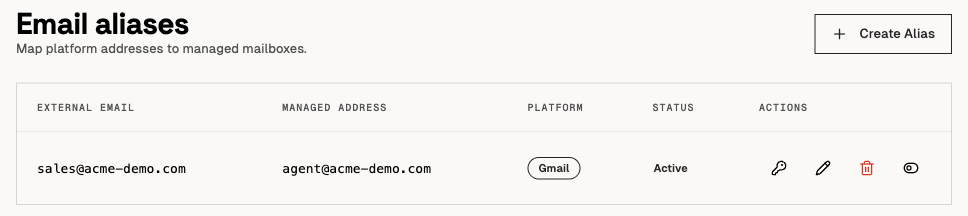
An Unsendbox email alias row maps an external address to the managed address that receives the mail. - 05
Test one way before production
Send a known seed message that matches the filter. Verify the expected Gmail copy and Unsendbox arrival. Test one reply, confirm the sender identity, and check that no rule sends the message back into the same path.
Setup proof
Work through this checklist before you route production mail. Each item is a state you can see in Gmail or in Unsendbox.
- Gmail shows the Unsendbox address as a verified forwarding address.
- The Gmail filter names an explicit condition and applies the Forward it action.
- The Unsendbox email alias maps the external address to the intended managed address.
- A known seed message arrives at the intended Unsendbox address.
- A single reply test confirms the sender identity and creates no forwarding loop.
Limitations
- Gmail does not forward spam by default.
- Google Workspace administrators can disable automatic forwarding.
- Gmail supports one forwarding address through the user automatic-forwarding method described in the administrator guidance.
- Google forwarding limits can change. Check current Google guidance rather than treating a captured limit as permanent.
- One-way forwarding can duplicate or re-enter mail if another rule points back to Gmail. Use explicit identities and test for loops.
- This is not a native Gmail API, OAuth, push notification, historical sync, or two-way sync integration.
- The current forwarding path does not justify a Google Workspace Marketplace claim.
Frequently asked questions
Can I keep Google Workspace as my primary mailbox?
Yes. Keep the Google MX records and mailbox experience in place, then forward selected identities or Gmail filters to managed Unsendbox addresses.
Does Gmail forward spam?
No, Gmail excludes spam from automatic forwarding by default.
Can I forward only selected Gmail messages?
Yes. After verifying the forwarding address, disable broad automatic forwarding and create a Gmail filter that uses the Forward it action.
What happens to the Gmail copy?
Gmail lets you keep the forwarded copy in the inbox or archive it. Choose the behavior that matches your review and retention workflow.
Can a Google Workspace administrator block this setup?
Yes. Administrators control whether users can configure automatic forwarding in Gmail End User Access settings.
Does Unsendbox sync Gmail history or labels?
No native history or label synchronization is evidenced. This page describes one-way forwarding and alias routing only.
Is this a Gmail API integration or a Google Workspace Marketplace app?
No. The current connection uses forwarding. No Gmail API client, Workspace extension, or Marketplace eligibility is claimed.
You might be interested in
Unsendbox documentation
Build your own integration
Unsendbox exposes its email and workflow operations through an organization-scoped MCP server, so you can connect another AI client or internal service the same way.